Mastodon due to the decentralized nature can result in a significant extra load on your site if someone posts a link to it. Every Mastodon instance where the post is seen (which can be 1 but also 100 or 1000 or …) will request not only the page and sub-sequentially the oEmbed json object to be able to show a preview in Mastodon. The page requests should not an issue as you surely have page caching, but the oEmbed object lives behind /wp-json/ and as such is not cached by page caches. The solution; the WP Rest Cache plugin and one small code snippet (for now). A lot more info can be found in Donncha’s excellent post on the subject.
So Autoptimize Pro has finally been released, somewhat secretively (I like flying under the radar).
All info about features can be found on https://autoptimize.com/pro/ including a 20% early birds discount code, but if you use my internet nickname/ handle of whatever you want to call it (it’s part of the domain of this blog and has 3 t’s in it 😉) as coupon code between now and November 16th, you’ll get an even bigger discount!
It has been long overdue, but I’m finally almost ready to release Autoptimize Pro. The first version of AO Pro (an add-on to be installed on top off Autoptimize) will have Image optimization, CDN, fully automated critical CSS and a number of “boosters” to improve performance even more, with more features are in the backlog.
If you’re interested in beta-testing fill out the form below and based on data submitted I’ll pick 10 beta-testers. As a beta-tester you’ll be able to use AO Pro free of charge until the end of the year.
Beta-testing is being finalized, I am currently not looking for additional testers.
Yesterday I had the day off, so I decided to finally upgrade my Thinkpad X13 to Ubuntu 22.04. Jammy Jellyfish (as the release is nicknamed) is nice but the new default display server, Wayland, blocks Shutter and other non-native screenshot apps from making screenshots. This interfering with my support workflow as I use Shutter not only to make the screenshot but also to edit and upload it to imgur. The solution was simple; I logged out and switched back to the Xorg display server on the login screen settings.
Coincidentally or not; making screenshots in Firefox (which can be handy to screenshot an entire page or a node for example) was suddenly disabled as well, so in about:config I had to toggle screenshots.browser.component.enabled back to true.
And lastly, also on the topic of Firefox; it now comes as a snap instead of a deb now and although I’m not dogmatic about deb vs snap, I see no need for Firefox being packaged/ updated by the OS as the in-browser update mechanism is sweet, so I installed the Mozilla-build instead.
Autoptimize 3.1 was just released with some new features and some fixes/ improvements:
new: HTML sub-option: “minify inline CSS/ JS” (off by default).
new: Misc option: permanently allow the “do not run compatibility logic” flag to be removed (which was set for users upgrading from AO 2.9.* to AO 3.0.* as the assumption was things were working anyway).
security: improvements to the critical CSS settings page to fix authenticated cross site scripting issues as reported by WPScan Security.
bugfix: “defer inline JS” of very large chunks of inline JS could cause server errors (PCRE crash actually) so not deferring if string is more then 200000 characters (filter available).
some other minor changes/ improvements/ hooks, see the GitHub commit log
I got some questions about why and how of the “Disable extra compatibility logic?” option, here’s some more info copy/pasted from my answer on the WordPress support forum:
well, back in the 3.0 days the assumption was that for existing and thus confirmed working installations the compatibility logic brought no advantages and *could* cause regressions, hence compatibility was disabled for those (there are no complex/ heavy queries in the compatibility code).
this new option gives users of “older installations” the option to enable compatibility anyway, but as it is only useful in case of problems, I would advice to keep it off unless something is broken and only then to enable it to see if is automatically fixes the issue 🙂
Autoptimize can help improve your site’s performance, but in some cases after installing and activating you might encounter issues with your site. Although frustrating and maybe even scary, these problems can generally be easily resolved by re-configuring Autoptimize and I’ll be happy to share how you can do that.
First off: if the problem is limited to just one (or two) page(s), go to that page’s edit screen and in the “Autoptimize this page” metabox simply disable “optimize this page” and forget about it (or if you want to be more specific you candisable just “optimize JS” or “optimize CSS” or “lazyload images” or …).
If the problem is more widespread, then try to identify what is breaking things by just disabling CSS or JS or HTML or Image optimization (incl. lazyload). Keep in mind you might have to clear your page cache after a configuration change (depending on your setup this might be a page caching plugin or on the server or at host level or at a 3rd party such as Sucuri or Cloudflare).
If the problem goes away by disabling CSS optimization, reactivate it and
If “aggregate CSS” and “also aggregate Inline CSS” are on, first try disabling “also aggregate inline CSS” and if still broken try also disabling “aggregate CSS”
Try adding wp-content/themes to exclude the theme CSS from being optimized
Try adding wp-content/plugins to exclude all plugins CSS from being optimized, if that works you can try narrowing it down further by excluding specific plugins e.g. wp-content/plugins/elementor
If the problem goes away by disabling JS optimization, reactivate it and
Check the browser console for relevant JavaScript errors (see this wordpress.org support article for info on how to do that)
If you see “jQuery is not defined“-errors on the browser console, make sure wp-includes/js/jquery/jquery.min.js is not aggregated (add it to the JS optimization exclusion field) or asynced/ deferred in any way.
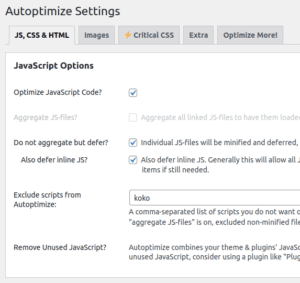
If “aggregate JS” is active, try switching to “don’t aggregate but defer”, optionally with “also defer inline JS” on as well (in which case you can likely remove at least the default exclusions).
Try adding wp-content/themes to exclude the theme JS from being optimized
Try adding wp-content/plugins to exclude all plugins JS from being optimized, if that works you can try narrowing it down further by excluding specific plugins e.g. wp-content/plugins/elementor (example in screenshot above: koko to exclude all Koko Analytics JS)
Image optimization or lazyload issues can be fixed by excluding the image(s) from those optimizations by either excluding (part) of the image path (e.g. wp-content/uploads/2022/10/whatever.jpg) or if the <img tag has a e.g. class attribute excluding by class-name (e.g. img-fancybox-hidden).
If the problem is with HTML minification, just keep that off, it’s not very important. Obviously, if you have some of the options on the “Extra” tab active, try deactivating them one by one.
Work on Autoptimize 3.0 is almost finished and it has some big changes both functionally and technically;
fundamental change for new installations: by default Autoptimize will not aggregate JS/ CSS any more (HTTP/2 is ubiquitous and there are other advantages to not aggregating esp. re. inline JS/ CSS and dependencies)
new: no API needed any more to create manual critical CSS rules.
new: “disable global styles” option on the “Extra” tab.
new: compatibility logic for “edit with Elementor”, “revolution slider”, for non-aggregated inline JS requiring jQuery even if not excluded (= auto-exclude of jQuery) and JS-heavy WordPress blocks (Gutenberg)
improvement: defer inline now also allowed if inline JS contains nonce or post_id.
improvement: settings export/ import on critical CSS tab now takes into account all Autoptimize settings, not just the critical CSS ones.
technical improvement: all criticalCSS classes were refactored, removing use of global variables.
technical improvement: automated unit tests on Travis-CI for PHP versions 7.2 to 8.1.
Obviously given the amount of changes, thorough non-regression tests are required and that’s where you come in; you can download Autoptimize 3 beta from GitHub and install it instead of 2.9.5.1.
As some of the changes (esp. the new defaults for CSS & JS optimization) are only applicable to new installations (so not upgrades from 2.9.x), having that tested would be much appreciated as well 🙂